BTL / g1ft3d cr00ks
Reading threat intelligence
in MISP
READMELab setup notes
The lab's supplied setup notes, formatted for reference.
Open MISP
https://localhost:8443/Use PyMISP
Use the Python virtual environment:
source ~/pymisp-env/bin/activateIf MISP is not loading
Check MariaDB, then start it:
sudo systemctl status mariadb
sudo systemctl start mariadb
Launch Chrome
pkill chrome
rm ~/.config/google-chrome/SingletonLock
google-chrome
STARTING POINT
Understand the event before counting anything
MISP is a platform for organizing and sharing threat intelligence. An event collects information about a threat or investigation. Its attributes are individual pieces of information, such as a filename, hash, IP address, or report link. An object groups related attributes so their relationship is clear.
I opened event 10128 in the lab's MISP interface. I started with the summary at the top, then moved into the attributes below it. An indicator of compromise (IOC) is an observable value that can help an analyst look for suspicious activity. Finding an IOC in an intelligence record does not mean my own computer contacted it.
- HeaderWho published it, when, and how it is tagged.
- AttributesRead each value with its type and category.
- ObjectsKeep a file with its hashes, or an IP with its port.
- ContextUse comments and the original report to explain the values.
Platform reference: MISP user guide.
QUESTION BY QUESTION
Follow the evidence in order
QUESTION 01
In Event ID 10128, what country issued the alert? What type of campaign is it tied to?
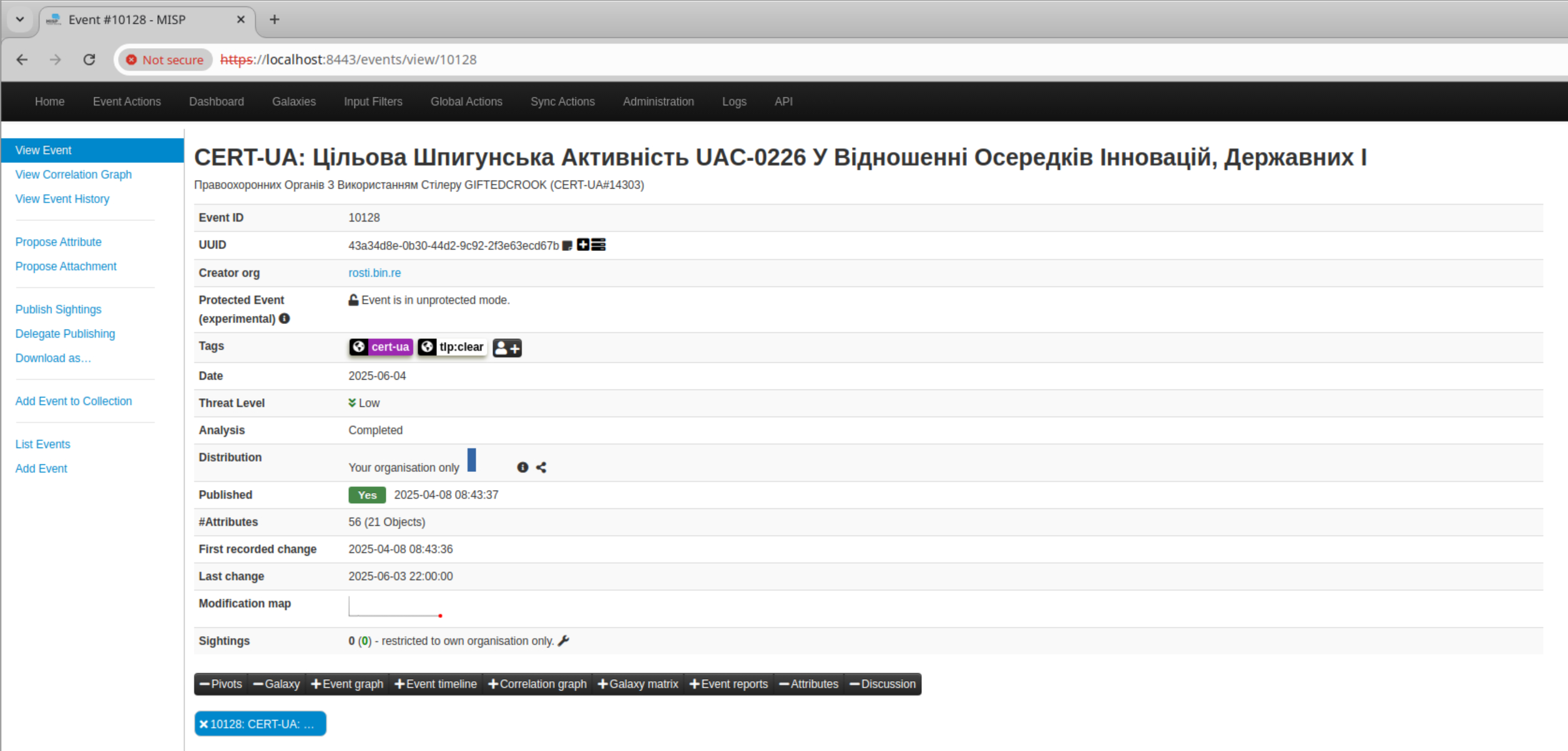
I started with the event title and the cert-ua tag. CERT-UA is the Computer Emergency Response Team of Ukraine; the linked advisory describes targeted espionage involving UAC-0226 and GIFTEDCROOK. Cyber espionage was deduced through Q1's answer template.
A tag can be a clue without explaining itself. Clicking cert-ua filtered events; it did not give me a definition. The useful next step was to check the named organization and source report. For the Ukrainian title, translating the whole phrase gives better context than translating one word.
Ukraine, Cyber-Espionage
QUESTION 02
What is the date the event was published? What is the Org (creator organization) of this event?
In the header, I read the Published row and Creator org row. The creator organization in MISP is rosti.bin.re; that is separate from CERT-UA, the source of the alert.
2025-04-08 08:43:37, rosti.bin.re
Clarifying the dates: Date is the event’s assigned incident/reference date; Published records publication, and Last change records an edit. The later Date value does not prove when the attack began or why the dates differ. I need the record history or source report to establish that.
QUESTION 03
How many Attributes are in this event? How many objects are in this event?
The #Attributes row already gives both totals, so there is no need to count every visible line.
56, 21
An attribute is a single value with a type and category, such as an IP address. An object groups related attributes. For example, a file object can hold its filename, MD5, and SHA-256 together. Those hashes are fingerprints of the file’s contents, not extra files.
QUESTION 04
How many unique categories are in the attributes section?
I expanded the objects and read the Category column across the event, collecting each distinct label once. The four categories are Payload delivery, Network activity, Artifacts dropped, and External analysis.
4
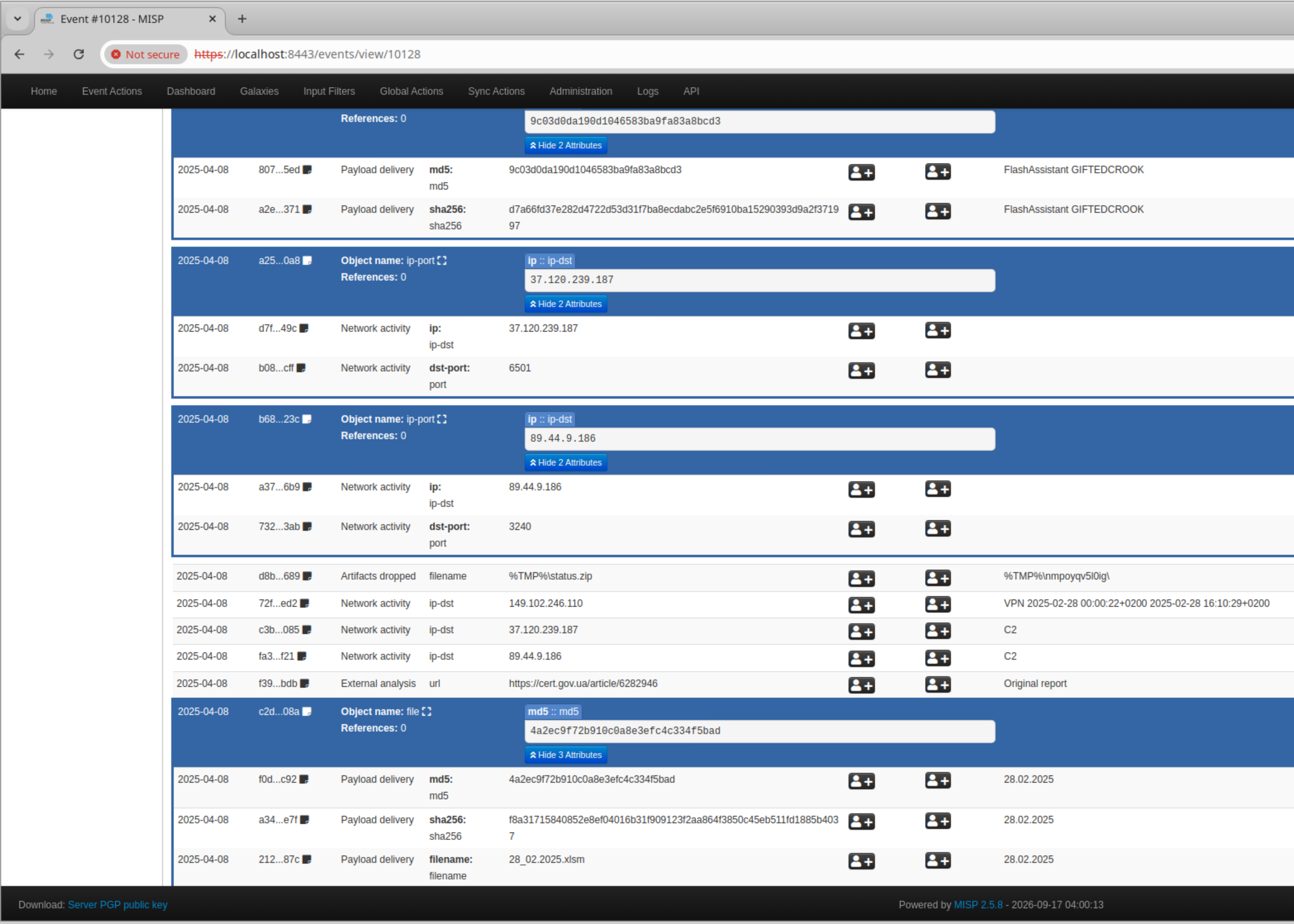
Category versus type: category describes the evidence’s role, such as Network activity. Type describes what the value is, such as ip-dst, filename, or sha256. Counting types would answer a different question.
QUESTION 05
What are the unique file extension IOCs we can extract from this event? Arrange in alphabetical order.
I looked at filename values, kept the suffix after the final dot, removed repeats, and put the extensions in alphabetical order. A filename can include a full path, so the ZIP under %TMP% still belongs in the list.
.ps1, .xlsm, .zip
.ps1 is a PowerShell script; .xlsm is an Excel workbook that can contain macros; .zip is an archive. An extension describes a format, not whether every file of that format is malicious.
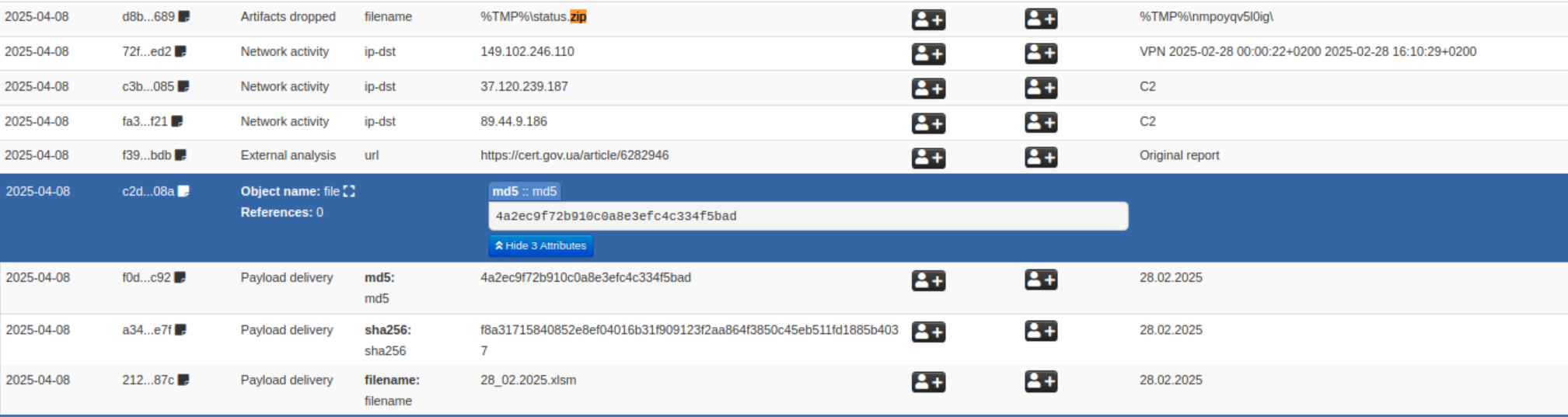
.zip and .xlsm.
.ps1 extension.QUESTION 06
What is the total number of office documents included in the event attributes?
I narrowed the review to Office document filenames, including the .xlsm workbooks. I initially counted seven in a filtered view; clearing the filter exposed more matches. That taught me to check the whole event before trusting a total.
9
Counting method: expand the objects, check every page of results, and count document entries once. A filename repeated in a blue object summary, a comment, or another visible field does not automatically represent another document.
QUESTION 07
What are the file names of the scripts included in the event attributes? Arrange in alphabetical order
This question needs the full names, rather than the number of documents or just their extensions. I found the two .ps1 filename attributes and listed them alphabetically.
kpbkewf32mm.ps1, nnnnrth.ps1

kpbkewf32mm.ps1. The spelling here follows the visible evidence.nnnnrth.ps1.Keep the object together: the filename and hash rows describe the same file. A script name tells me what was recorded; it does not, by itself, show what commands the script runs.
QUESTION 08
According to this event, an artifact was dropped at the start of infection. What is the file name and the path?
I located the standalone Artifacts dropped attribute and read both its value and comment. The value is %TMP%\status.zip; the comment contains %TMP%\nmpoyqv5l0ig\. %TMP% is a Windows environment variable for a temporary directory.
status.zip, %TMP%\nmpoyqv5l0ig\

Read the path’s role carefully: the source advisory shows Compress-Archive taking files from that directory and writing status.zip. It does not describe the ZIP being extracted into the directory. Although the lab question says “at the start of infection,” this attribute row alone does not establish timing. CERT-UA’s host indicators ↗
QUESTION 09
According to this event, A C2 was established. What is the first IP and Port used by the adversary? Use the defanged IP recipe by CyberChef.
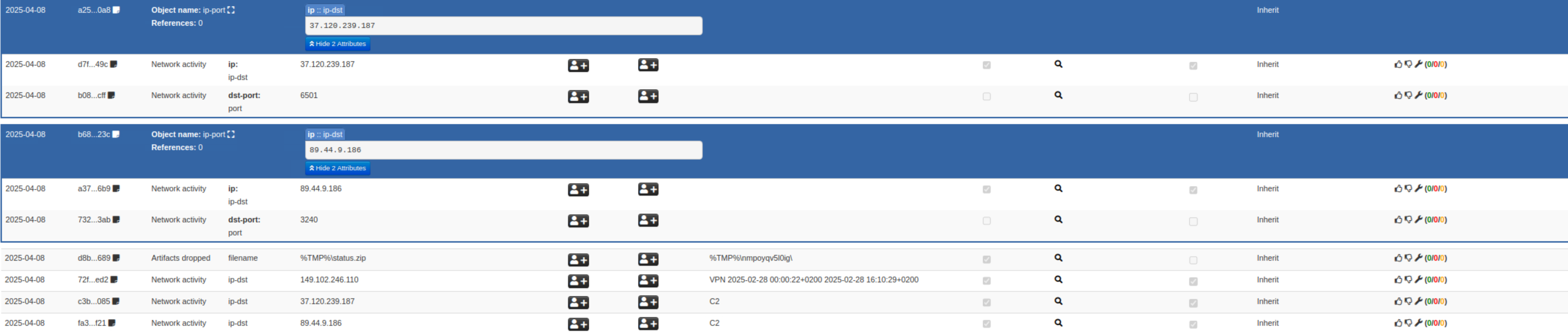
C2 means command and control: communication that lets an attacker direct compromised software. The standalone IP attributes have C2 in their comments. I matched the requested IP to its own ip-port object, where ip-dst identifies the destination address and dst-port gives its port.
89[.]44[.]9[.]186, 3240
Defanging means writing an indicator in a form less likely to become an accidental clickable link: dots become [.]. In CyberChef, add Defang IP Addresses and enter the IP to make that change. CyberChef transforms text; it does not decide whether the IP is malicious.
“First” is the lab’s label here. The position of a row on screen does not prove which server was used first.
QUESTION 10
What is the second IP and Port used by the adversary in this campaign? Use the defanged IP recipe by CyberChef.
I found the separate object for 37[.]120[.]239[.]187 and read its own destination port: 6501. I did not borrow port 3240 from the nearby object.
37[.]120[.]239[.]187:6501
The border matters: an object ends at its enclosing border. Standalone rows below it do not inherit its port. The separate 149[.]102[.]246[.]110 row is labelled VPN, so it is not one of these two C2 answers.
QUESTION 11
Perform IOC enrichment using ICANN IP Lookup for the first C2. In what country is this IP located?
This step adds outside context to an indicator, which is called enrichment. In ICANN Lookup, search the ordinary dotted form of the first IP, 89[.]44[.]9[.]186, and inspect the returned network registration information.
France
The country result is not shown in my saved lab screenshots, so I retain this as the lab’s reference answer. Registration data can change; a country field describes the registration context and does not prove the attacker’s nationality or physical location.
QUESTION 12
Perform IOC enrichment using ICANN IP Lookup for the second C2. In what country is this IP located?
Repeat the lookup for 37[.]120[.]239[.]187, removing the brackets before searching. Keep each result attached to the correct IP so the two answers do not get swapped.
Netherlands
This lookup result is also not shown in my saved lab screenshots. When repeating the exercise, save the IP, the exact country field, and the lookup date together. ICANN provides registration information through RDAP, a protocol for looking up that information. ICANN’s lookup explanation ↗
QUESTION 13
Lastly, what is the TLP tag assigned to this event?
I returned to the header and read the Tags row.
tlp:clear
Traffic Light Protocol (TLP) communicates sharing boundaries. TLP:CLEAR permits unrestricted sharing under the TLP rules, subject to normal copyright requirements. It does not mean the malware is safe, and it does not change MISP’s separate Distribution access setting. FIRST’s TLP definitions ↗
FINDINGS
What the event brought together
The event describes a cyber-espionage campaign reported by CERT-UA. It brings together macro-enabled Excel documents, PowerShell scripts, a ZIP archive, and network indicators. The useful part is the context connecting them: the type identifies the value, the object groups related fields, and the comment explains its reported role.
| Lab label | Destination IP | Port |
|---|---|---|
| First C2 | 89[.]44[.]9[.]186 | 3240 |
| Second C2 | 37[.]120[.]239[.]187 | 6501 |
Evidence limit: this was an investigation of a prepared intelligence event. These records describe reported activity; they are not endpoint or packet evidence from a system I investigated myself.
CHECK MY UNDERSTANDING
Questions to revisit
How do I know which port belongs to an IP?
I read the destination IP and port inside the same object. A nearby standalone IP row is a separate attribute and does not inherit the port above it.
Why can the attribute count be larger than the file count?
One file can have several attributes, including its filename and multiple hashes. I count unique file records when the question asks for files.
Does an IP's country identify the attacker?
No. Registry information describes the registration of network resources. Hosting, VPNs, and proxies can separate infrastructure from the person operating it.
Does clicking a MISP tag explain its meaning?
Not necessarily. A tag can filter related events without providing a definition. I use the source organization or the published standard to confirm what it means.
Recap
I learned to read a MISP event as related evidence instead of a list of answers. I checked the header for context, kept attributes inside their objects, separated filenames from hashes, and used source material when a value needed explanation. The main habit I want to keep is asking what a field proves before deciding what it means.